Building the operator: an AI agent that holds the keys, and the leash that holds it
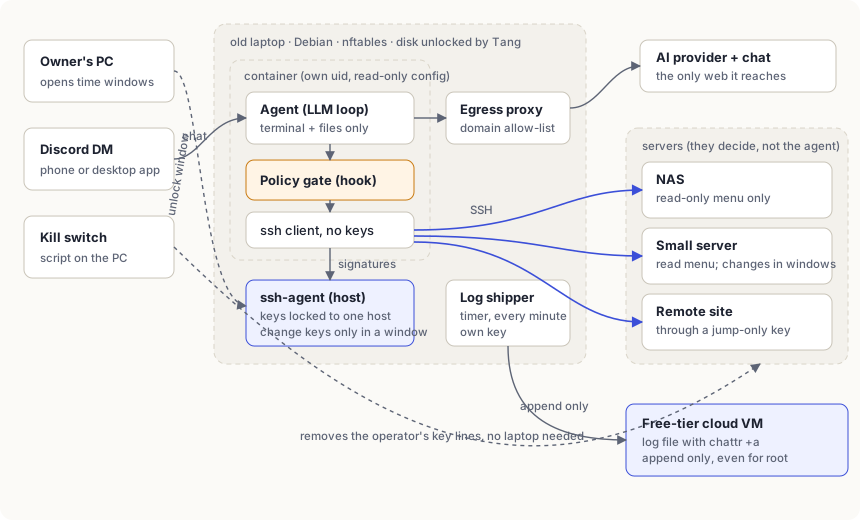
I run two AI agents at home. The assistant reads my documents, mail and the web, keeps notes and drafts things. The operator is the only one allowed to touch my servers and my network. Splitting those two jobs was the most useful thing I did this autumn. This post is how the operator is built, what holds it in line, and what went wrong on the way.
Why the assistant gets no keys
Anything an AI agent reads can carry instructions: a web page, a PDF, an email, a line in a log file. That is prompt injection, and nobody has a complete fix for it. So the useful question is not “how do I stop the model being fooled” but “what is the worst it can do when it is fooled”.
For an agent that reads the internet, the answer has to be “nothing on my servers”. So the rule became: the assistant reads the world and holds no keys; the operator holds the keys and reads only me and the machines. It has no web access at all. If the assistant wants something done on a server, the request goes through the operator, under my eye.
Both are Hermes Agent instances running on Claude through the API. I talk to the operator in a private Discord DM; its bot ignores everyone else.
The box
An old ThinkPad from a drawer. The thinking happens in the cloud, so the laptop only runs a container, an SSH agent and a few timers. Fresh Debian with no desktop, SSH with keys only, a firewall that lets in SSH from the home network and nothing else, automatic security updates without automatic reboots, and lid and sleep switched off so it behaves like a small server.
The disk is encrypted and unlocks itself at boot by asking a small key server elsewhere on the network (Clevis and Tang). Take the laptop out of the house and it asks for a passphrase instead.
Layer 1: the servers decide
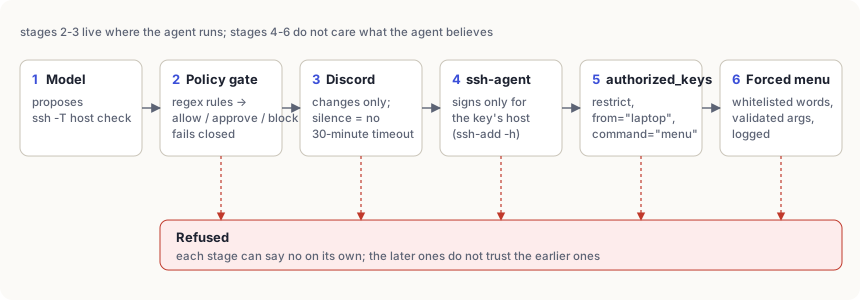
This is the layer I trust most, because it lives on the servers and does not care what the agent believes. Every operator key is pinned in the server’s authorized_keys file with three options:
restrict,from="192.0.2.10",command="/usr/local/bin/ro-menu" ssh-ed25519 AAAA... operator-nas-ro
restrictswitches off forwarding, terminals and the rest in one word.from=makes the key work only from the laptop. Copied anywhere else, it is useless.command=ignores whatever the agent asked for and runs a small script instead.
That script is a menu: “uptime”, “disk usage”, “container status”, “recent logs” and about a dozen more, each with its arguments checked. Anything else, a shell, a file deletion, a clever pipe, gets refused and a line in the server’s log.
For the one machine where the operator may change things, there is a separate key without the menu. That key has its own leash (layer 3).
Layer 2: the agent never sees a key
The keys are not inside the agent’s container. They are loaded into an ssh-agent on the laptop itself, and the container only gets the agent’s socket. It can ask for a signature; it can never read or copy a key file.
Each key is also locked to its one server with a destination constraint:
ssh-add -h nas.lan /etc/operator/keys/operator-nas-ro
Point that key at a different machine and the agent refuses to sign, before the other machine even sees a request.
Layer 3: write access expires
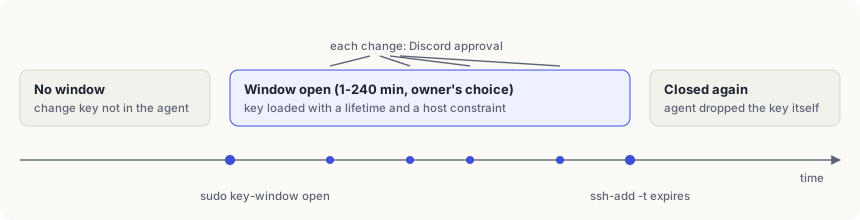
The key that can change things is never loaded at boot. When I want the operator to do real work, I open a window from my PC:
ssh laptop sudo key-window open vps-rw 30
Under the hood that is ssh-add -t 30m: the key goes into the agent with a 30-minute lifetime and drops out on its own, even if I forget.
Layer 4: every change asks me in Discord
Inside a window, each changing command still arrives in the Discord DM as Approve once / Always / Deny buttons. I answer on my phone or in the desktop app, whichever is closer. No answer in 30 minutes means it does not run.
Two lessons: never press “Always”, because it saves a permanent rule the agent can reuse without asking; and silence must mean no, which the timeout gives you.
Layer 5: a gate in front of every command
Before any tool call runs, a small script reads it and answers allow, ask or block. Read-only checks pass, changes ask, and the known tricks are blocked: extra SSH options that would swap the key or route around the rules, touching the key agent, editing its own settings. If the script crashes or its rules file is missing, everything is blocked (fail closed; I tested that by hiding the file).
It has a self-test of more than 150 cases, and every hole a review finds becomes a test before it becomes a fix. Still, I treat it as the visible layer, not the wall. Rules written over shell text can always be dodged by someone clever enough. Layers 1 to 3 are the ones that hold when it is.
Layer 6: a narrow network
The container’s only way to the internet is a proxy with a short allow-list: the AI provider and Discord. Everything else, including any general web, is refused. The firewall lets it reach SSH on its handful of servers and nothing more on the home network.
A log it cannot edit
Every gate decision and every window I open is copied once a minute to a tiny free-tier cloud VM. The file there has the append-only attribute:
chattr +a /var/log/operator/operator.jsonl
It can grow, but nobody can rewrite or delete it, not even root, without first removing the attribute. The key that ships the lines can only append; it cannot even read the log back. If the laptop is ever compromised, the record of what it did is somewhere it cannot reach.
The kill switch
A script on my PC, not on the laptop, removes every operator key from every server and keeps a backup. One more command puts them back. I tested it on one server: the operator was locked out there, still worked elsewhere, and my own access was untouched.
The first real job
First window, first task: install the pending security updates on one server. The operator asked whether to leave the container runtime alone, checked for a backup, saved a copy of the system configuration, did a dry run, then asked me in Discord seven times, once per command. Fifty-one packages later, everything was still running.
I checked independently afterwards. The updates were in. Its summary miscounted the containers, which is exactly why I check: it does the tedious part, I verify, and neither of us trusts the other blindly.
What went wrong
A password lost a piece of itself. Docker Compose treats a $ in a settings file as the start of a variable. A password containing one was silently cut short, and the leftover fragment showed up where I could see it. Rotated. Now: no dollar signs in those files, or write them as $$.
Windows ate my quotes. The old PowerShell that ships with Windows strips quotes from arguments passed to programs like ssh, and adds an invisible marker to the start of piped text. Remote commands arrived broken. The fix was to send commands as a script over standard input and clean the first bytes on arrival.
The agent kept its old rules. A chat session keeps the instructions it started with. After I gave the operator new rules, it kept refusing to use a key it was now allowed to use. Start a new session after every rule change.
Network unlock changed the laptop’s address. The early-boot network and the normal one ask the router differently, so after the first automatic unlock the laptop got a new address, and every server’s from= refused it. The cable connection is a fixed address now.
A safety net almost caught me. Every firewall change arms a five-minute timer that undoes it unless I confirm, so a bad rule cannot lock me out. A failed install left its timer armed, and it came within a minute of undoing a rule I wanted. Now I check for armed timers after every rerun.
My coding assistant refused to loosen the leash. I build most of this with Claude Code. When I asked it to deploy a wording change that gave the operator a little more room, its own safety checks blocked it. I ran that one line myself. Mildly annoying, mostly reassuring.
If you build one
- Put the real limits on the servers, where the agent cannot argue with them.
- Keep keys out of the agent’s reach, and lock each one to its server.
- Make write access temporary, and opened by a human.
- Make “no answer” mean “no”, and never click “Always”.
- Fail closed, and test that you do.
- Keep the log on a machine the agent cannot touch.
- Build the kill switch before you need it, and run it once.
Next: a locked-down browser, so the operator can use the web pages of devices that have no other way in, pointed only at those few pages. That one gets its own post.